
OneCore’s OCR (Optical Character Recognition) is used primarily in AP Processing to automatically read, extract, and validate data from invoices and supporting documents. The goal is to reduce manual data entry and speed up invoice processing.
Setting:

How to use
If Automatic OCR is enabled, the invoice is processed immediately upon upload. This will be marked with this icon under the “OCR” column adjacent to the invoice you uploaded.
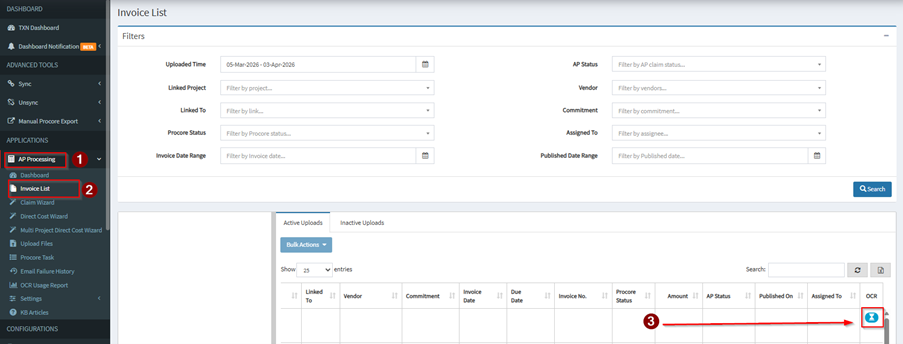
This will change to a green checkmark icon once OCR scanning is completed.

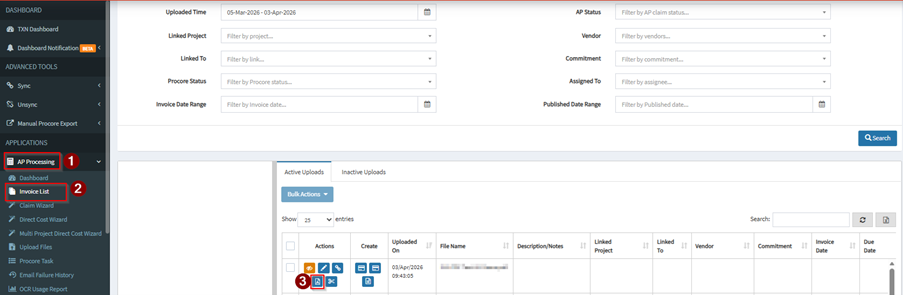
If Automatic OCR is disabled, it will only be processed after you initiate it manually using this button beside the invoice that you uploaded.
Notes:
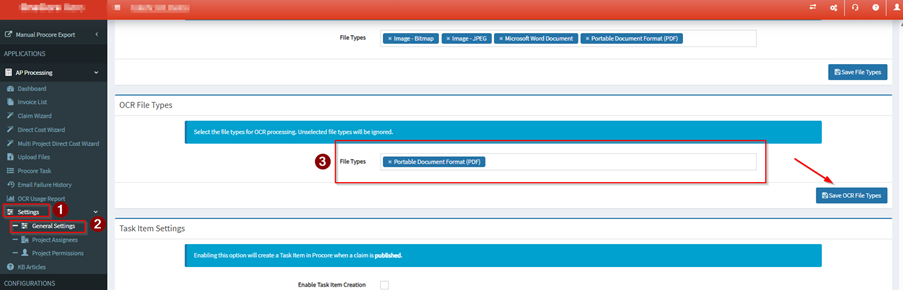
OCR can only process the file types that you select on the AP Processing settings.
OCR will scan and populate the columns Linked Project, Vendor, Commitment/Order Number, Invoice Date and Invoice Number.