
Overview
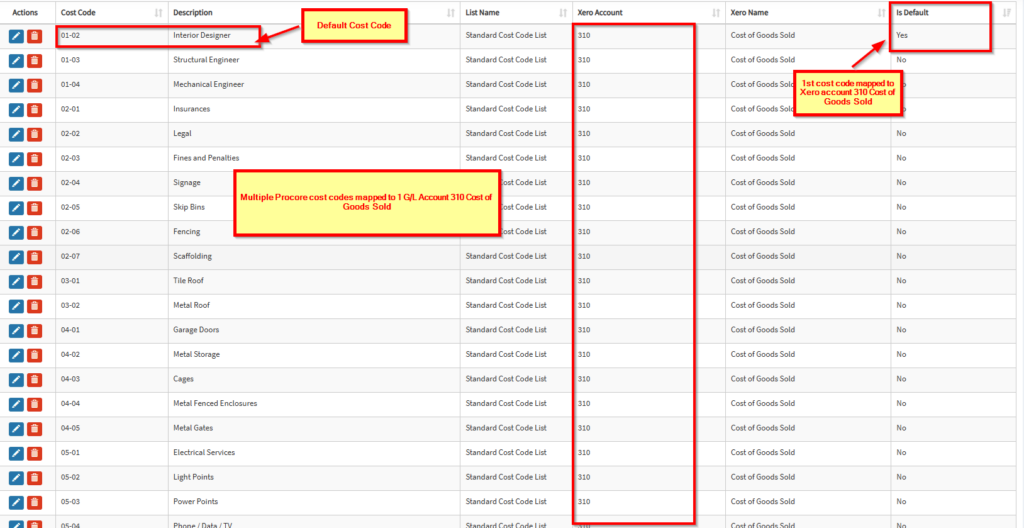
In some cases, you may have more cost codes in Procore than project-related general ledger accounts in Xero. When this occurs, you can use multi mapping, which allows multiple Procore cost codes to be mapped to a single account.
If you would like to enable multi mapping, please contact support and we will enable it for your OneCore account.
Important Considerations
Multi mapping can be useful, but it comes with a key limitation:
- When direct costs originate from your Xero, and the selected G/L account is linked to multiple Procore cost codes, OneCore cannot determine which cost code to assign the transaction to.
- This may result in incorrect cost allocation in your Procore budget.
✅ Recommended approach:
- Enter direct costs in Procore where possible. This ensures the correct cost code is selected.
How Multi Mapping Handles Direct Costs
When using multi-mapped accounts:
- Direct costs such as:
- Xero Bills
- Credit Notes
- Spend Money transactions
- Manual Journals
⚠️ Limitation:
The integration cannot determine the correct cost code for individual line items when transactions are entered from Xero.
Line item will be sent to Procore using the default cost code (i.e., the first cost code mapped to that G/L account).
Mapping Cost Codes
Follow these steps:
- Navigate to:
- Standard Cost Codes → Expense Mapping
- Click the “Unmapped Procore Standard Cost Code” tab
- Select an unmapped cost code and click Edit
- Choose the corresponding Xero account from the dropdown
- Click Save
KB Article: How to map cost codes to Xero accounts in OneCore Xero – Interfy Help
Workaround for Incorrect Cost Code Allocation
If a direct cost is assigned to the wrong cost code due to multi mapping:
- Unsync the direct cost from OneCore
- Edit the cost in Procore and assign the correct cost code
- Re-sync if required
For detailed steps on unsyncing a direct cost, please refer to the relevant guide or contact Support for assistance.
KB Article: How to Unsync Procore Entries in OneCore. – Interfy Help
Summary
- Multi mapping allows multiple Procore cost codes to link to a single G/L account
- It is best used when direct costs are entered in Procore
- Direct costs originating from Xero will default to a single cost code
- Manual adjustments may be required in certain cases
If you’d like to enable multi mapping or need help troubleshooting, please reach out to support@interfy.com.au