
Interfy Help
  • OneCore Status
  • Internal Login
  • Log Out
  1. Home
  2. MYOB
  3. Mapping in OneCore
  4. How to setup default revenue/expense accounts for non-budgeted line items for OneCore MYOB
  1. Home
  2. MYOB
  3. How to setup default revenue/expense accounts for non-budgeted line items for OneCore MYOB
Searching...

How to setup default revenue/expense accounts for non-budgeted line items for OneCore MYOB

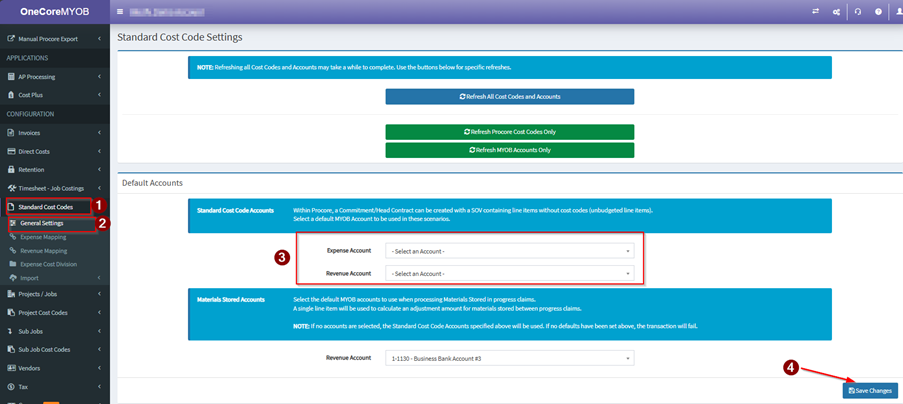
Within Procore, a Commitment/Head Contract can be created with a SOV containing line items without cost codes (unbudgeted line items).
Select a default MYOB Account to be used in these scenarios.

Global – this will apply to all projects

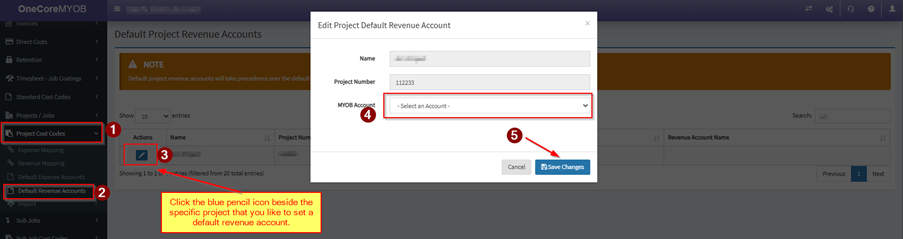
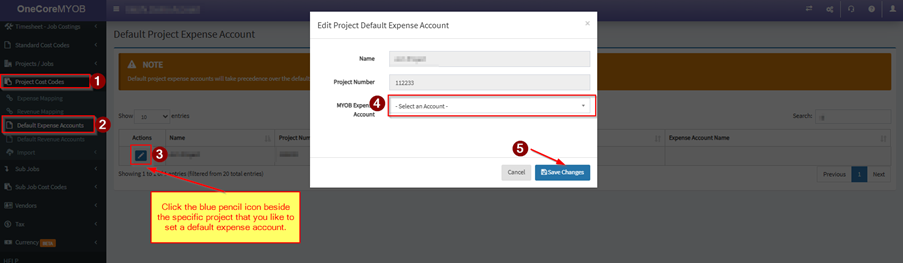
Project specific – this will apply to the specific project which will override the setting in Global

Global Default Revenue/Expense Accounts
Project Specific Default Revenue/Expense Accounts

Default Revenue Account
Default Expense Account
Updated on April 8, 2026
Tagged: Default ExpenseDefault Expense AccountDefault RevenueDefault Revenue AccountNon BudgetedNon-budgeted line itemsunbudgeted line items

Related Articles

  • Multi-currency setup for use with OneCore (MYOB)
  • OneCore Time Sheeting & Job Costing Setup with MYOB
  • What’s changed in OneCore MYOB March 23
  • Procore Direct Cost Workflow – Procore to MYOB
  • Distributing Costs to Projects for Staff on the payroll (ie. Salaried Staff) using the Manual Journal Direct Cost Tool in MYOB
  • What do I do if I rename a project in Procore ?
Interfy Help > Articles > MYOB > Mapping in OneCore > How to setup default revenue/expense accounts for non-budgeted line items for OneCore MYOB
© 2020 Interfy Pty Ltd
  • OneCore Status
  • Internal Login
  • Log Out