
This dashboard features:
- Additional transaction filter and search capabilities
- Ability to replay transaction failures (max 5 attempts)
- Ability to ignore/activate individual transaction failures
- Configure automatic ignore of specific transaction failures
This dashboard shows where the transactions originate. (i.e Procore or QuickBooks)
You can search transactions on date range

There is a detailed log of all the transactions passing through the integration listed underneath.
The increased search capabilities allow you to filter on the various transaction fields: Received, Project, Event Type, Reference and Status.

If a transaction does not push through, it will register as a failure with a blue arrow.
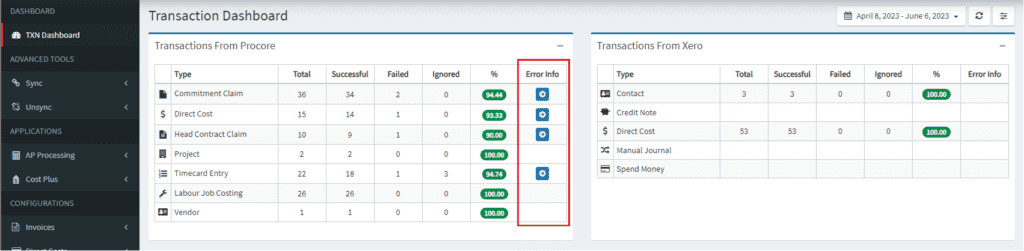
Click the blue arrow to isolate that particular failure. There will be a detailed reason why in the Status and Additional Info fields.


In this example a commitment claim failed. and the reason was unmapped cost code “03-000 General” used on line item 1.
To rectify you would
- Perform the one time cost code mapping (from unmapped cost code tab in revenue and expense mapping menus)
- Come back to the transaction in the log and click the Green replay button.

If there is a transaction failure and you do not need to action it, you can click the ignore button to remove it from your active error list.

If you see a failure and you do not understand the reason/do not know how to rectify simply take a screenshot and email into support@interfy.com.au and we will assist you.