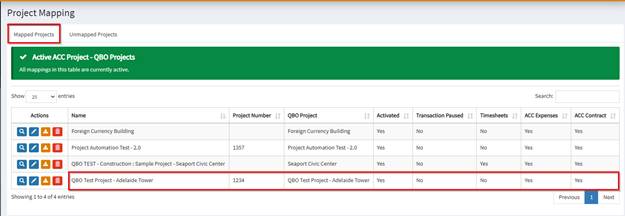
Autodesk Projects can either be mapped to a QBO sub-customer or a QBO Project. Note that only transactions under a mapped project in OneCore will flow through the integration.
How to map an existing Autodesk Project:
- Ensure that support@onecoreconnect.com is a member of the Project. This user should have Data Management, Build, Insight and Cost Management enabled.
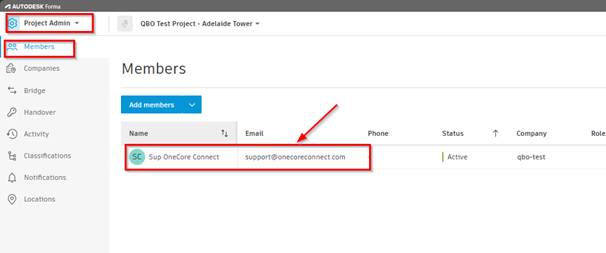
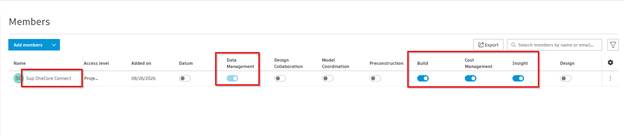
- Once added to the project with the correct access permission, please ensure that the QBO sub-customer/project is also created in QBO.
- After completing both sides, you can then refresh your OneCore Project Data to fetch these new project updates to OneCore.

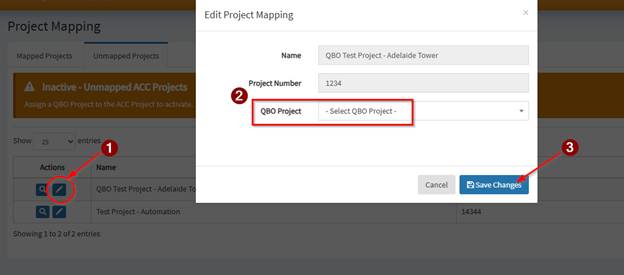
- Proceed to Project > Project Mapping > Unmapped Projects and locate the new project fetched by OneCore from Autodesk
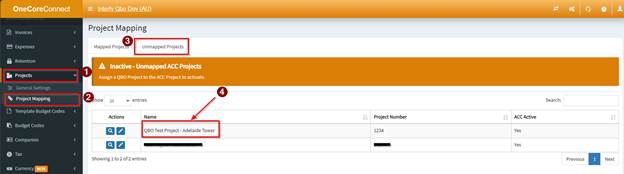
- Click on the pencil icon and select the QBO Project/sub customer to where this Autodesk project should be mapped into and click Save Changes.
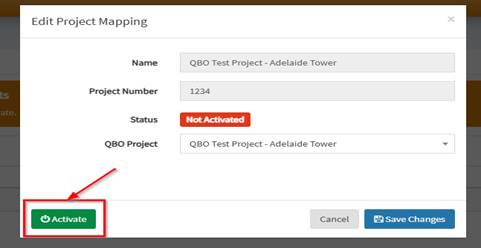
- Click Activate to activate the Project in OneCore
- Once activated, enable the necessary transactions types required for the project and click Save Changes.
- Newly mapped project should then appear on the Mapped Projects Tab